




The internet is meant for everyone, but unfortunately, it is not accessible to everyone. If your website is not compliant with ADA/WCAG standards, you are not only restricting your services to those with a disability but are also facing the risk of unwarranted legal enforcement. Our mission is not only to make the Internet accessible for people with disabilities but also to mitigate the legal risk.
What is ADA Compliance?
The Americans with Disabilities Act (ADA) is a law that prohibits discrimination based on disability. Today, accessibility spans beyond restrooms, airports, and ramps to ensure people with disabilities can use the Internet equally. ADA compliance is not only a legal requirement, but it is also a moral obligation to ensure that your website meets the ADA compliance standards.
ADA Compliance Consulting Services in Denver
At Pulse Software Solutions, we go beyond simply ticking compliance boxes. We aim to empower your business to offer equitable and barrier-free digital experiences across websites, mobile apps, documents, and enterprise systems. Our team has successfully remediated a wide range of complex systems, including:
- Websites with 1000s of PDF files
- E-commerce stores with 10s of thousands of SKUs
- Interactive tools like product configurators and booking systems
We ensure your digital assets meet or exceed ADA/WCAG 2.1 Level AA standards.
Why ADA Compliance Matters
ADA compliance is critical not only to avoid legal pitfalls but also to open up opportunities:
| Risk | Opportunity |
|---|---|
| Non-compliance exposes your business to lawsuits, fines, and brand damage. | ADA-compliant digital assets expand your audience, improve SEO, and boost conversions by serving 61 million Americans with disabilities. |
| Many industries — education, healthcare, finance, ecommerce — face rising legal action over inaccessible digital content. | Demonstrating social responsibility strengthens customer trust and opens new market segments. |
Our Proven 3-Phase Approach
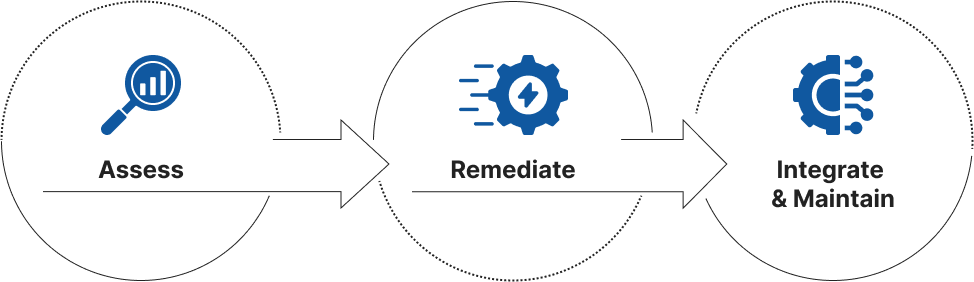
Assess
- Comprehensive Audit: Automated & manual testing across pages, PDFs, videos, forms, and applications.
- Custom Reporting: Detailed list of WCAG 2.1 failures with remediation guidance.
Remediate
- Expert Remediation: Our engineers fix code, design accessible UI components, and optimize dynamic content.
- PDF/Document Remediation: Convert thousands of inaccessible documents to ADA-compliant formats.
Integrate & Maintain
- Ongoing Compliance Management: Embed accessibility into your release cycles, CMS, and workflows.
- Training & Governance: Empower your teams to maintain compliance over time.
Let’s explore how ADA compliance matters to different types of websites. Different platforms face unique challenges, from blogs to e-commerce. In this section, we’ll dive deeper into the requirements for each, starting with e-commerce sites.
ADA Compliance for Ecommerce Sites
E-commerce websites face unique challenges when it comes to ADA compliance, including:
- Dynamic product grids and filters
- Interactive elements like shopping carts, wishlists, and configurators
- Frequent content updates
- Rich media (images, videos, 360-degree views)
- Multi-step checkout flows
Each of these features can present accessibility risks if not implemented correctly.
E-commerce ADA Compliance Process
| Phase | Steps | What We Actually Do |
|---|---|---|
| 1) Discovery & Audit |
|
|
| 2) Remediation Planning |
|
|
| 3) Implementation & Remediation |
|
|
| 4) Media & Document Compliance |
|
|
| 5) Testing & Validation |
|
|
| 6) Training & Handoff |
|
|
| 7) Ongoing Maintenance | Because ecommerce sites constantly update products, promotions, and UX features, ongoing compliance is critical. |
|
Common Ecommerce ADA Issues We Fix
- Missing or generic alt text on product images (e.g., “image1234.jpg” instead of “Men’s blue cotton shirt with button-down collar”)
- Product carousels with no keyboard or swipe support
- Filters and sort options that don’t notify screen readers when results update
- Pop-ups (coupons, exit intents) that trap keyboard focus or don’t announce themselves
- Error messages in checkout forms that aren’t programmatically linked to form fields
- Confusing or skipped heading levels on category pages
- Timed elements like flash sales not give users enough time to respond
- CAPTCHA challenges that lack accessible alternatives
ADA Compliance for Sites with 1,000+ PDFs
PDFs are a significant source of ADA violations. Inaccessible PDFs can exclude users who rely on screen readers and other assistive technologies, even if your website itself is ADA-compliant. For organizations with thousands of PDFs, such as universities, legal firms, or healthcare providers, we offer a structured, large-scale remediation approach.
ADA PDF Compliance Process
| Phase | Steps | What We Actually Do |
|---|---|---|
| 1) Inventory & Audit |
|
|
| 2) Sampling & Prioritization |
|
|
| 3) Remediation Preparation |
|
|
| 4) PDF Remediation |
|
|
| 5) QA & Validation |
|
|
| 6) Metadata & Compliance Documentation |
|
|
| 7) Training & Maintenance |
|
|
| 8) Ongoing Maintenance | Because sites with thousands of PDFs are living systems, with frequent additions. |
|
Common PDF Issues We Fix
- Missing or incorrect document structure (tags)
- Inconsistent or illogical reading order
- Unlabeled form fields in interactive PDFs
- Images without alt text
- Complex tables lacking proper header associations
- PDFs with scanned images lacking OCR text layers
- Missing document language specification
- Decorative elements (lines, shapes) incorrectly marked as meaningful content
ADA Compliance for Sites with 1,000+ Blogs
Blog sections often grow unmonitored for years, leading to accessibility problems that can result in legal action. Common issues include:
- Inconsistent use of heading structures:
This can confuse screen readers and users navigating via keyboard. - Missing alt text on inline images:
Users with visual impairments rely on alt text to understand image content. - Inaccessible embedded media (e.g., videos, podcasts):
Content such as videos and audio files may not have captions or transcripts, making them inaccessible. - Poor link practices like “click here” without context:
Links without meaningful context are difficult for screen readers to interpret. - Older posts using outdated HTML or page builders:
Legacy content may not meet current accessibility standards, creating barriers for users.
These issues can make even modern-looking blogs a prime target for ADA lawsuits, especially in regulated industries (finance, healthcare, education) where blogs provide essential information.
Blog ADA Compliance Process
| Phase | Steps | What We Actually Do |
|---|---|---|
| 1) Inventory & Audit |
|
|
| 2) Sampling & Prioritization |
|
|
| 3) Template & Theme Fixes |
|
|
| 4) Individual Post Remediation |
|
|
| 5) QA & Validation |
|
|
| 6) CMS Workflow Integration |
|
|
| 7) Ongoing Maintenance | Blogs evolve daily. To keep compliance intact. |
|
Common Blog Accessibility Issues We Fix
- Improper heading levels causing an illogical content structure
- Missing or irrelevant alt text on images (or decorative images not marked as such)
- Videos without captions or transcripts
- Tables pasted from Word or Excel with inaccessible structures
- Buttons or links lacking descriptive text (“Read More” without context)
- Inaccessible social sharing widgets or pop-ups
- Poor color contrast on highlighted quotes or code blocks
Top ADA Compliance Software Solutions (with When to Use)
ADA compliance software can be a valuable tool for businesses looking to address accessibility issues on their websites or digital assets. However, it’s essential to understand that not all solutions are suitable for every business. Below, we provide a breakdown of top ADA compliance software options and the best scenarios for their use.
| Tool | When to Recommend It | Why / Key Considerations |
|---|---|---|
| 1) AccessiBe | Small businesses need quick, low-cost improvements, but are not concerned about full WCAG/ADA legal defensibility. | Uses AI overlays to adjust UI elements, but doesn’t fix underlying code, so not enough for enterprise sites or complex systems. |
| 2) UserWay | Mid-sized businesses wanting overlay features + a lightweight monitoring widget. | Slightly more customizable overlay; affordable entry-level compliance, but still not a substitute for real remediation. |
| 3) EqualWeb | Businesses needing overlays plus manual remediation options, especially those wanting to eventually move beyond overlays. | Offers hybrid approach: overlay + optional hands-on fixes; better suited than AccessiBe if you plan long-term compliance. |
| 4) AudioEye | Organizations need monitoring, analytics dashboards, and legal support packages if sued. | Strong legal positioning + ongoing monitoring, but fixes still rely heavily on automated adjustments. |
| 5) Monsido | Enterprises wanting detailed accessibility audits & continuous scanning across very large sites (10,000+ pages). | Unlike overlays, it focuses on reporting issues + quality assurance; you’ll still need developers to remediate findings. |
| 6) Siteimprove Accessibility | Organizations with internal teams who want to integrate accessibility into quality assurance workflows (QA, SEO, analytics). | Robust scanning + enterprise integrations; no automated fixes — ideal for companies committed to manual remediation. |
| 7) Silktide | Marketing-heavy teams who want visual heatmaps showing accessibility barriers + actionable recommendations. | Great reporting UX; helps content & design teams collaborate, but like Monsido/Siteimprove, doesn’t “fix” issues automatically. |
| 8) Deque Axe Monitor | Enterprises with dev teams able to fix issues in code, wanting dev-focused tools + CI/CD integration. | Industry-standard scanner backed by Deque’s accessibility expertise; best if you plan serious, code-level remediation. |
| 9) Tenon.io | Agencies or developers looking for API-based accessibility testing inside custom tools or workflows. | Headless accessibility testing; powerful if you want to automate tests as part of builds, but it’s not an overlay or dashboard. |
| 10) BoIA’s AMP (Accessibility Management Platform) | Large enterprises need comprehensive services: audits, automated scans, manual testing, training, and legal documentation. | More of a full-service solution; expensive but thorough — fits healthcare, education, government, or anyone under strict compliance pressure. |
Key Takeaways:
- Use overlays (AccessiBe, UserWay, EqualWeb) only when you need immediate stop-gap fixes while planning real remediation for your website. They’re ideal for small, simple sites but don’t fully protect against legal challenges.
- Use monitoring tools (Monsido, Siteimprove, Silktide) when you have developers and designers able to fix accessibility issues within your codebase. These tools provide ongoing scanning for large or dynamic sites like blogs or e-commerce stores.
- Use dev-oriented tools (Deque, Tenon) if you want to integrate accessibility testing into your development pipeline and maintain compliance over time with each release.
- Use full-service platforms (BoIA’s AMP, AudioEye) if you’re a large organization that needs comprehensive support, including legal documentation and hands-on assistance.
Why Choose PSS?
ADA compliance is not just a legal requirement; it’s an opportunity to make your digital assets accessible to a broader audience and establish trust with your customers. At Pulse Software Solutions, we offer proven expertise, a structured remediation process, and ongoing support to ensure your website, mobile apps, documents, and PDFs are fully accessible.
- Proven Success: 2000+ projects delivered globally since 1998.
- Deep Expertise: Remediation of advanced systems beyond static websites.
- Holistic Service: Assessment, remediation, training, and maintenance — not one-time fixes.
- Compliance with Confidence: We deliver documentation you can present during audits or litigation.
Don’t risk facing legal action or alienating a significant portion of your audience. Let us help you create an inclusive digital experience for everyone.
Contact Pulse Software Solutions today to start your ADA compliance journey!
FAQs
What is ADA compliance for websites?
ADA compliance means making your website or digital product accessible to people with disabilities, following standards like WCAG.
Why is ADA compliance substantial?
It helps prevent accessibility lawsuits and also expands your audience, improves SEO, and increases trust and conversions.
What ADA and WCAG levels do you target?
We bring digital assets to WCAG 2.1 Level AA, which is the common standard used for legal and practical compliance.
What types of systems can Pulse make ADA-compliant?
We work on websites, eCommerce stores, web apps, mobile apps, PDFs, and enterprise systems, including complex platforms.
Do you handle large sites with many pages or documents?
Yes, we have experience remediating sites with thousands of PDFs and large eCommerce catalogs with many SKUs.
What is your process for ADA compliance?
We follow a 3 phase approach: assess with audits and testing, remediate issues in code and content, then integrate and maintain compliance long term.
Do you test both automatically and manually?
Yes, audits include automated tools plus manual testing with screen readers and keyboard navigation to catch real user barriers.
Can you make eCommerce stores ADA-compliant?
Yes, we audit and fix accessibility risks in product grids, filters, carts, checkout flows, and third-party plugins.
Do you provide documentation for compliance?
Yes, we deliver detailed reports and remediation documentation that you can use for audits or legal needs.
Do you offer ongoing ADA compliance support?
Yes, we can embed accessibility into your release cycles and train your team so compliance is maintained over time.
Looking for an agency for your next cloud initiative?
Since 1998, Pulse Software Solutions has delivered over 5,000 solutions worldwide, with operational excellence at the core of our work culture.
See Our Success Stories Request a Free Estimate OUR CLIENTS
Who We Work With














RELATED BLOGS
ADA Compliance Case Studies

How Accessible Should Your Website Be? Understanding WCAG Conformance Levels
The Americans with Disability Act (ADA) was instituted in 1990 in an effort to put an end to discrimination based on different abilities. This revolutionary act led to designing an…
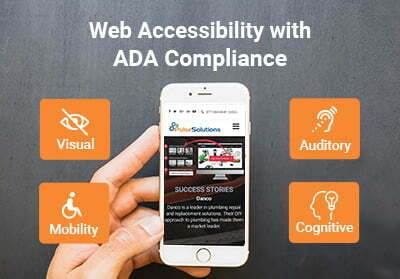
ADA Compliance leads to better conversions & accessibility
Many Pulse web systems are designed from the ground up to be ADA compliant, our web engineering teams specialize in meeting and exceeding ADA compliance regulations. If you have a…
The Importance of Web Accessibility: Why ADA Compliance Matters for Your Business
In today’s digital-first world, having a website that is accessible to all users is not only a good business practice but also legally required. Web accessibility ensures that everyone, including…


